Text Messaging Opt-In
Who gets our text messages, and how they agree to them.
Last updated: November 14, 2026
This page shows who receives text messages from Paragon Aerial Solutions, LLC and how each person agrees to receive them. Messages are sent by three software applications that we operate: Paragon Processing, CrewSync and BidBuilder. All of them are work notifications to the people who use that software. None are marketing, and none are sent to the general public.
Paragon Processing alerts
Who receives them. Members of the Paragon Aerial Solutions team who run our in-house data-processing software, Paragon Processing. These messages are not sent to customers or to the public.
What they are. Automated operational alerts about the recipient's own processing jobs: a step finished, a step needs attention, or a question or review is waiting. The recipient can reply with a short answer. No marketing messages are sent.
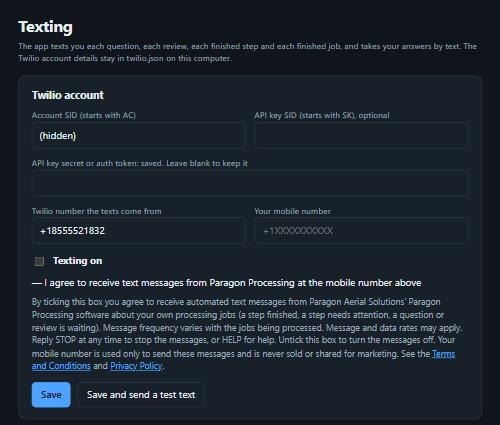
How consent is given. The recipient opens the Texting settings page inside Paragon Processing, types their own mobile number, and ticks the box labelled "Texting on — I agree to receive text messages from Paragon Processing at the mobile number above". Texting stays off until that box is ticked, and unticking it turns the messages off.
The consent wording shown beside that box reads:
By ticking this box you agree to receive automated text messages from Paragon Aerial Solutions' Paragon Processing software about your own processing jobs (a step finished, a step needs attention, a question or review is waiting). Message frequency varies with the jobs being processed. Message and data rates may apply. Reply STOP at any time to stop the messages, or HELP for help. Untick this box to turn the messages off. Your mobile number is used only to send these messages and is never sold or shared for marketing. See the Terms and Conditions and Privacy Policy.
The opt-in screen (the box is not ticked until the person ticks it):
Sample messages:
- "[BCCG-Brookwood] Done: DJI Terra - lidar cloud."
- "[BCCG-Brookwood] NEEDS ATTENTION: 1 ft control gate. 2 of 33 marks at or over 1 ft."
- "[BCCG-Brookwood] Question 14: Use the merged cloud or the per-block clouds? Reply 14 then your choice: 1=Merged, 2=Per-block"
CrewSync notifications
Who receives them. Team members of a company that uses CrewSync, our project-management software, who have a user account in that company's CrewSync workspace.
What they are. Automated notifications about that person's own work items: a personnel action form or a purchase order is waiting on them, one they created was approved or sent back, or a rental they requested is about to end. Each message includes a link to the item in CrewSync.
How people are enrolled. Texts go only to a team member whose mobile number has been entered in their own row on the CrewSync Team page, in the column labelled "Mobile (texts)", beside a checkbox labelled "Text this person when something needs them". The number is entered by that company's CrewSync administrator for the purpose of these work notifications. No texts are sent to anyone whose number is not entered there. Unticking the checkbox turns the texts off for that person, and the person can also reply STOP at any time.
Sample messages:
- "CrewSync PAF #1006 (New Hire – J. Smith) from Ashley needs your approval: (link to the form)"
- "CrewSync PO 2291 (Acme Rentals, $4,250.00) is approved. (link to the purchase order)"
- "CrewSync: rental on PO 2291 (Acme Rentals) ends 2026-11-20. (link to the purchase order)"
BidBuilder messages
Who receives them. Job superintendents working on a project that is being estimated or tracked in BidBuilder, our estimating software.
What they are. A single message with the link to that project's crews-and-production form, sent when an estimator on the same project presses "Text It".
How people are enrolled. An estimator who is signed in to BidBuilder types the superintendent's mobile number and presses "Text It" to send that superintendent the form link for the project they are both working on. One message is sent per request; BidBuilder does not send recurring messages. Every message ends with "Reply STOP to opt out."
Sample message:
- "Crews & production for Main Street Gas Line: (link to the form) It saves as you go; hit Submit when done. Reply STOP to opt out."
Keywords and replies
- STOP — stops all messages from the number, from all three applications. Reply: "You have been unsubscribed from Paragon Aerial Solutions alerts and will receive no more messages. Reply START to resubscribe."
- START — resumes messages. Reply: "You are resubscribed to Paragon Aerial Solutions alerts. Msg frequency varies. Msg & data rates may apply. Reply HELP for help, STOP to cancel."
- HELP — Reply: "Paragon Aerial Solutions work alerts (Paragon Processing, CrewSync, BidBuilder). Help: 205-394-6256 or info@paragonaerialsolutions.com. Msg & data rates may apply. Reply STOP to cancel."
Message frequency varies. Message and data rates may apply.
More information
See our Terms and Conditions and Privacy Policy. No mobile information is sold or shared with third parties or affiliates for marketing or promotional purposes.
Questions: 205.394.6256 or info@paragonaerialsolutions.com.
Questions about this page?
Call or send us a note and we will get you an answer.